
Local Services Ads / 9 min read
Bad leads from Google Local Services Ads: how credits work now.
A salesperson calls instead of a customer. Someone asks for work you do not offer. Another enquiry comes from outside your territory. All three feel like bad leads, and Google does not treat them the same way. Most of the dispute advice online describes a process that no longer exists.
If you want to dispute a Local Services Ads lead, the current process is automatic assessment plus feedback, not a manual refund request. Google reviews lead quality over 30 days and applies eligible credits on its own. You can still report what happened through the lead feedback survey.
The distinction that matters is between three different things: a lead Google considers invalid, an enquiry that was genuine but unsuitable for your business, and a real customer who simply did not book. Each needs a different response.

Check whether credits apply to you at all
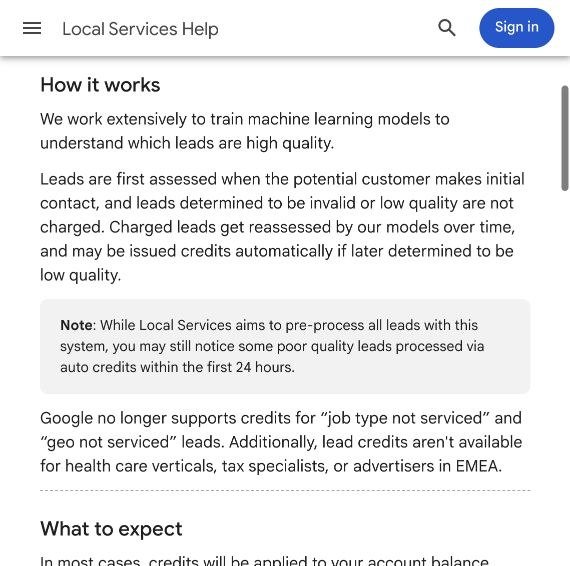
Do this before you spend time hunting for a dispute button. Google's lead credit page says credits are not available for health care verticals, tax specialists, or advertisers in EMEA. It also says Google no longer credits leads marked "job type not serviced" or "geo not serviced".
That second point catches a lot of contractors out. A request for work you do not do, or from an area you do not cover, is no longer something you get money back for. It is something you fix in your settings, which is covered further down.
If your eligibility is unclear, ask support about your specific account and category, and keep the answer with your billing records.
How automatic credits work
Google assesses each lead when the customer first makes contact. Some are never charged. Others are charged and then reassessed: Google's documentation on leads describes continuous assessment over 30 days, with an automatic credit if a lead is later judged poor quality, duplicate or invalid.
Credits usually reach your account balance within 30 days, and the original charge still appears on your invoice. Lead reports show four charge statuses: Not charged, Charged, In review and Credited.
Keep two records apart. Your own records explain what happened to the enquiry. Google's billing record shows whether it charged or credited the lead. A recent charge is not necessarily the final outcome, and marking a lead "unsuitable" in your CRM does not mean a credit is due. Do not deduct a credit you are expecting from your reports until it actually appears.

A bad lead is not always a creditable lead
"Bad lead" is too vague to guide either billing or campaign changes. Classify what actually happened:
| What happened | Record it as | What to investigate |
|---|---|---|
| A sales pitch or obvious spam | Suspected invalid contact | Feedback and charge status |
| The same customer contacting again | Possible duplicate | Whether it belongs to an existing enquiry |
| A request for work you do not offer | Service mismatch | Business categories and service types |
| A request outside your territory | Geographic mismatch | The job address and your service areas |
| The customer rejected your price | Genuine, lost on price | Offer, expectations, sales process |
| You could not attend soon enough | Genuine, lost on availability | Capacity and ad schedule |
| Nobody answered or followed up | Handling failure | Call routing and response process |
This is an internal classification, not a promise of what Google will credit. Local Services Ads charges per lead, and a customer choosing another contractor does not make the contact invalid.
Google is also specific about what counts as a lead. A missed call during business hours is charged if the caller stays on the line for more than 20 seconds, and a call that goes to voicemail is charged after the same 20 seconds whether or not they leave a message. Text and email messages count too. So "we never booked anything" is not evidence that a charge was wrong, and an unanswered phone during business hours is costing you money.
What "Rate this lead" still does
The feedback route still exists. In the Local Services Ads interface, open Leads, select Rate this lead in the top right, open the survey and submit it. Google says the feedback helps it send you more of the leads you want and fewer of the ones you do not, and that it may occasionally credit leads reported as poor quality. Occasionally is the operative word.
Write feedback that would support an investigation. This is useful:
Caller offered website services and did not request any HVAC work.
"Terrible lead, refund immediately" is not. Report what actually happened, and do not describe a price objection as spam or a customer comparing quotes as a fake enquiry. If several people answer calls in your office, give one person responsibility for reviewing leads every week, because memory gets unreliable fast.
Wrong jobs and wrong areas need a targeting fix
If you keep receiving requests you cannot fulfil, waiting for credits leaves the cause in place, and since Google no longer credits these reasons, you are simply paying for them. Review your settings with whoever actually accepts and schedules jobs:
- Do we currently do every type of work we have enabled?
- Do we handle the equipment and property types customers are asking about?
- Are there minimum job sizes or restrictions we should be clearer about?
- Can the team reach every advertised area economically?
Then compare those answers with your recent rejected enquiries and look for a pattern before cutting broadly. Several commercial refrigeration requests point to a category problem. Several enquiries from one distant area may justify narrowing coverage. Always record the job address rather than the caller's location: a landlord phoning from another city may own a property right inside your territory.
The move into Google Ads, and when it reaches you
Google is moving Local Services Ads into Google Ads as a specialised Performance Max campaign with pay-per-lead goals. Google's transition page sets out the phases:
| When | Who |
|---|---|
| August 2026 | Select home and storefront service advertisers in the United States |
| Late 2026 | Service-area businesses without storefronts, and accounts with custom bidding or booking setups |
| 2027 | Non-US accounts and remaining categories |
Most HVAC contractors are service-area businesses without a storefront, which on Google's published schedule places them in the later phase rather than the first. Your own account notice decides your timing, so treat the table as a guide rather than a date.
Billing stays pay-per-lead: you pay for valid calls, messages and bookings, not clicks. The campaign is keywordless, targeting from your Business Profile, categories and service areas. This is not a reason to build an ordinary Performance Max campaign and assume it bills like Local Services Ads; it does not.
After migration, leads live under Goals, then Conversions, then Leads in Google Ads, with charge status and feedback. Service areas, ad schedules and business categories can be changed from the campaign's Settings tab, and your service types carry across automatically. Past lead history transfers, including messages and older call recordings. Past campaign performance reports do not, so export them before you migrate. Keep a dated copy of your current targeting, budget and lead-quality numbers as well, so you can tell whether anything changed.
When a charge still looks wrong
If an expected credit never arrives, gather the facts before contacting support:
| Field | What to save |
|---|---|
| Lead identifier | The reference shown in the account |
| Contact date | When the enquiry arrived |
| Contact type | Call, message or booking |
| Charge status | Current status and amount |
| What happened | A short factual description |
| Feedback | Whether and when you submitted it |
| Supporting record | The relevant message or call details |
Once the 30-day assessment period has passed, ask a clear billing question. Something like: this contact was an unsolicited sales pitch; feedback was submitted on the contact date; the lead is still charged after the assessment period; please confirm the billing treatment. That is a support enquiry, not an appeal you are entitled to win. Send only the records needed to identify the lead, not unrelated customer information.

Measure after credits, and after qualification
A large credit total is not a sign the campaign is working. The business needs profitable jobs. Track separately: total enquiries, leads charged, credits actually posted, genuine enquiries you could fulfil, jobs booked and completed, and the reasons suitable enquiries did not become jobs.
Net lead spend = lead charges minus credits actually applied. Compare that against qualified enquiries, booked jobs and completed work, never against raw lead counts.
Because credits and bookings both arrive late, mark recent months as provisional and revisit them. Comparing a fully reconciled old month with an unfinished current one, without saying so, will mislead you. A low cost per lead can hide poor targeting, and a high booking failure rate often exposes missed calls, slow responses or limited availability rather than bad leads.
Our conversion tracking guide covers connecting enquiries to real outcomes, and our Google Ads management uses those outcomes to guide spend and targeting. Rate leads, reconcile credits, fix the settings that create unsuitable enquiries, and judge the advertising by the work it brings in.