
Meta Ads / 9 min read
Meta lead ads for HVAC: why the leads are junk, and how to fix it.
Your Facebook campaign produced 40 leads and the dashboard looks healthy. Your office tells a different story: several people never answer, some do not remember filling anything in, and others want work you do not do. Before you change the audience or raise the budget, look at what the campaign asks people to do, and what happens after they do it.
The short version: use a Higher intent form, add one or two qualifying questions, respond within minutes during staffed hours, and send real customer outcomes back to Meta. For HVAC, the offer matters as much as the form. A tune-up or a planned repair suits a short instant form far better than a system replacement, which needs advice, an assessment and a large commitment.

Work out what "junk" actually means
Not every unsuccessful enquiry is fake. A person who submitted a form by accident needs a different fix from a genuine customer your team called back two days later. Classify the problem before you change anything:
| What your team sees | What to investigate |
|---|---|
| Invalid contact details | Form accuracy and possible spam |
| "I didn't request this" | Accidental submission or an unclear offer |
| Wrong service or wrong area | The ad's message and your qualification |
| No answer | Response time, contact details, follow-up |
| Interested but not booking | Price, availability, expectations |
| Booked, then cancelled | Appointment confirmation and commitment |
Do not count everyone who missed one call as an invalid lead. Ask the office to record a specific outcome for every enquiry, or "the leads are junk" becomes one explanation for six unrelated problems. More form questions will not fix an unanswered office phone.
Choose an offer that suits a lead form
Someone scrolling Facebook has not decided to hire an HVAC contractor. Your ad interrupts them while they are doing something else, so the next step has to be clear and small:
- Request a seasonal AC tune-up.
- Ask about a heating maintenance visit.
- Book a diagnostic visit for a problem they have been putting off.
- Enquire about a maintenance agreement.
Say what the visit includes, where you work, and any genuine restrictions. If you advertise a price, make clear whether it covers maintenance, diagnosis or repair. A "free inspection" headline followed by an unexpected call-out charge creates disappointment before the technician has even arrived.
Emergencies belong on search
A homeowner who has been ignoring a noisy AC may respond to a Facebook offer. Someone whose heating just failed wants an available technician right now, and search advertising meets that demand far better than a callback form nobody answers for an hour. Our guide to Meta ads vs Google Ads covers how the two channels serve different moments.
Replacements need a slower route
A short, discount-led form cannot do the work of a replacement consultation. Replacement customers need to understand equipment options, installation, warranties, financing and the assessment before they are ready. Meta can still feed that work through useful content, real project examples and a clear invitation to book an assessment. Test a detailed landing page against a properly qualified instant form, and run replacements as a separate campaign with its own qualification and follow-up.
For the planned-work side, our guide to Meta ads for tune-ups and maintenance plans covers how to build those offers.
Switch from More volume to Higher intent
Meta's Higher intent form adds a review screen before submission, giving people a moment to check what they are sending. Meta's documentation on form types describes the options. It adds a deliberate step; it does not verify that someone owns the property, can afford the work or will pick up when you call.
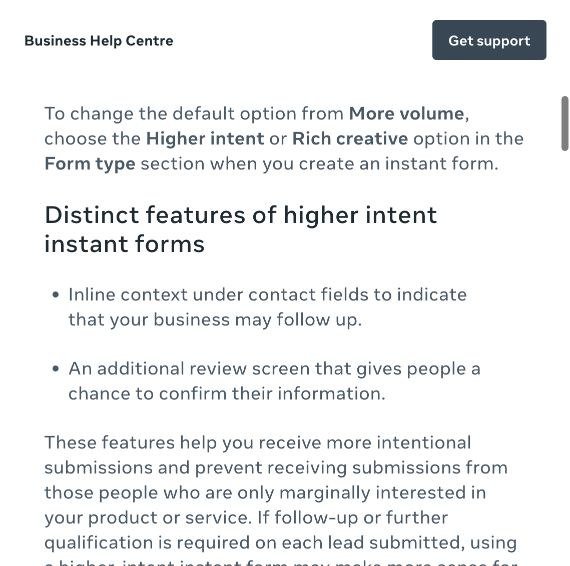
- Select Higher intent.
- Explain the service and the next step in the introduction.
- Ask only for the contact details your team actually uses.
- Add your qualifying questions.
- Preview the whole journey, including the review and confirmation screens.
A published instant form cannot be edited, so create a new version and attach it to the ad. Then compare booking outcomes between the two. A higher cost per form is fine if more of them become jobs, and a drop in lead volume is not success by itself.
Ask one or two questions that change the decision
Qualification exists to find out whether you can help, not to make the form feel like a job application. For a local HVAC campaign, start with two:
What is the ZIP code of the property needing service? This is where the job is, which may not be where the person is.
What would you like help with? A short list that matches what you actually offer: AC tune-up, AC problem or repair, heating tune-up, heating problem or repair.
If the campaign promotes one service only, use the second question for timing, or for authority to arrange the work:
Are you the property owner, or authorised to arrange this service?
That works better than rejecting every renter, since a tenant may have permission and a property manager arranges work without owning anything. Avoid questions people cannot answer, like naming the failed component. And use the answers when you call back; asking for information and then ignoring it adds friction for nothing.
Use the confirmation screen to set expectations
"Thanks, we'll be in touch" leaves every important question open. Tell people which business will contact them, what about, when, and whether anything is confirmed yet:
Thanks for requesting an AC tune-up with [Business]. Our team will call you during opening hours to confirm the property ZIP code and arrange an available appointment. Submitting this form does not reserve a slot.
Only promise a faster response if the team can keep that promise every time. And keep the offer, the form and the callback about the same service: someone who asked for maintenance should not get an unexplained replacement sales pitch.
Follow up within minutes, with someone responsible
A new lead is a live enquiry, not a row to download tomorrow. During staffed hours, aim for a first contact attempt within minutes. That is an operating target, not a promise that a particular response time produces a particular result.
- Send leads straight into your CRM or lead inbox.
- Notify the person responsible for responding.
- Send an acknowledgement through the agreed channel.
- Make the first real contact attempt.
- Record the result and the next action.
An automatic message confirms receipt; it does not replace the booking conversation. Open the call specifically: "Hi, this is [Name] from [Business], you asked about an AC tune-up through our Facebook form. Is now a good time to confirm the property details?" If nobody answers, follow up within the permission they gave, and stop when someone declines. For overnight submissions, set an honest expectation and call when the office opens. If you cannot handle enquiries at certain times, look at ad scheduling and staffing together.

Send booked jobs back to Meta
If the campaign only counts a submitted form, Meta has no way to tell a casual enquiry from a customer who booked. Connecting your CRM through the Conversions API fixes that, and Meta's CRM integration guide describes how sharing later lead stages helps it find better leads. Use consistent stages:
| Stage | What it should mean |
|---|---|
| New enquiry | A form was submitted |
| Qualified | The work and location fit |
| Booked | A real appointment was agreed |
| Completed | The visit took place |
| Sold | A quoted job was accepted, where relevant |
The part most guides leave out
Meta pairs the CRM connection with a performance goal that optimises for those later stages, called conversion leads in its developer guide and qualified leads in its help centre. It only works with instant forms, and Meta's guide lists conditions for using it well: at least 200 leads a month, data uploaded at least once a day, a target stage that happens within 28 days of the lead, and a target stage that converts between 1% and 40% of leads.
Most single-location HVAC contractors will not generate 200 Meta leads a month. Below that, connect the CRM anyway, because honest outcome reporting is valuable on its own, but do not expect the optimisation goal to behave the way Meta's case studies describe. And because a replacement sale can easily take longer than 28 days, "booked" is usually a better stage to optimise towards than "sold".
Sending events does not prove the campaign is optimising towards them, so verify the setup and test it end to end. Preserve the lead ID so outcomes connect to the original enquiry, and prevent duplicates. Above all, never mark an unanswered enquiry as booked to make the report look better; inconsistent records poison the exact signal you are trying to give Meta.
Judge the fixes by completed work
Track cost per qualified enquiry, cost per booked appointment and cost per completed job next to the familiar cost per lead, along with contact rate, time to first response and cancellation rate. Compare the same offer and area over a sensible period, and give recent enquiries time to book before judging them.
Clarify the offer, then revise the form, then fix response handling, then improve outcome reporting. Change all four at once and you will never know which one worked.
Our Meta ads management connects these steps so campaign decisions reflect what happens after the form. A cheap form submission is only worth something if it starts a job your business can actually do.